Weather Radar Live Map
- 4.7
- Rating
- 100.00K
- Installs
- Free
- Price
 Analysis by App-foxy
I usually judge a weather app by what happens after the first few days. A dramatic radar animation can be fun to explore, but the real question is whether I still open it when I am rushing to work, planning a walk, or deciding if outdoor plans are worth the risk. Weather Radar Live Map makes a strong first impression because it puts changing conditions at the center of the experience rather than treating the radar as a secondary detail.
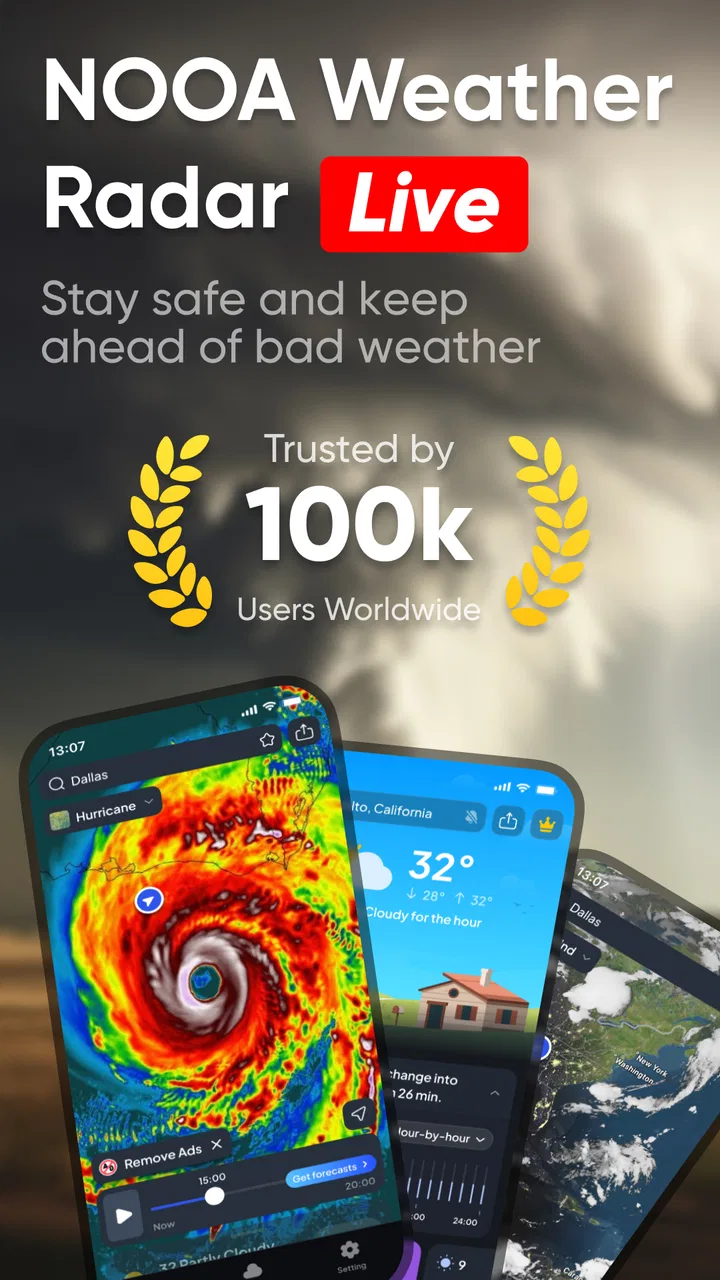
This is a free weather app from LeoStudio Global Ltd., aimed at people who want more than a simple temperature number. Its focus is visual: precipitation movement, temperature forecasts, hurricane information, and lightning tracking. That combination gives it a more practical identity than a basic daily forecast widget. I found myself using it less like a traditional forecast page and more like a quick decision tool: open the map, check what is approaching, then decide whether to leave now, wait, or change plans.
The app is available for Everyone and runs on Android 8.0 or newer. It has reached over 100 thousand installs and holds a 4.6 average from around 7.6 thousand ratings, which suggests that the central idea is connecting with a meaningful audience. It is currently version 1.0.19, and the free entry point makes it easy to test without committing money first.
You May Also Like

 Blood Strike: 2.5 Anniversary
Blood Strike’s Loadouts Turn Every Drop Into a Tactical Gamble
A close look at Blood Strike’s custom loadouts: how fast access to signature weapons reshapes its battle royale rhythm, rewards preparation, and narrows the gap between fights.

 Pandora - Music & Podcasts
Pandora’s Music Is Easy to Start, but Harder to Recover
Pandora’s strength is its low-effort path from a seed to a station. Its weak spot is how much confidence it asks you to place in connection, setup, and quiet recovery.

 8 Ball Pool
 Is Built on Rivalries, Rematches, and Routine
A close look at the rivalries, rematches, shared routines, and unanswered safety questions that turn a quick pool match into a persistent mobile community.

 Samsung Music
’s Quiet Strength Is Playing What You Already Own
Its reach comes less from spectacle than from dependable access to a personal library. That simplicity is both the app’s strongest retention engine and its ceiling.

 AccuWeather: Weather Radar
AccuWeather Review: A Quick, Clear Forecast for Everyday Decisions
For everyday plans, the best forecast is the one you can understand quickly. AccuWeather makes rain timing, radar, and local conditions easy to act on, with a few trade-offs.

 Hill Climb Racing
Why Hill Climb Racing Still Turns Crashes Into One More Run
A tiny car, a bumpy hill and one more upgrade: Hill Climb Racing keeps resurfacing because its simple chaos makes every near-miss feel personal.
More From Our News Desk
View All News


Why the first week feels useful
During my first week, the most appealing part was the shift from asking “What is the weather?” to asking “What is the weather doing?” A static forecast can tell me that rain is expected, but a radar view helps me think about timing. If a band of precipitation is moving toward my area, the map gives the forecast a sense of direction and urgency. That is especially useful when I am deciding whether to start a short trip, take a dog outside, or wait before cycling.
The visual approach also suits people who do not enjoy reading several forecast panels. Instead of comparing many lines of text, I can look for the weather pattern that matters immediately. The temperature forecast remains useful for clothing and planning, while the precipitation layer answers the more immediate question of whether I am likely to get caught outside. Lightning tracking adds another level of awareness when a normal rain forecast does not fully describe the situation.
Hurricane tracking is a particularly important reason to install it, although it is not something most people need every day. When a tropical system becomes relevant, having a weather app that already includes that type of information is more convenient than searching for a separate tracker at the last minute. I would not treat any single consumer app as a replacement for official emergency guidance, but the feature gives the app a clear role during periods of severe weather interest.
One practical habit improved the experience for me: I stopped opening the app only after seeing dark clouds. Checking the map before leaving gave me a better chance to notice weather approaching from a nearby area. That is a small workflow change, but it is where the app becomes more useful than a standard glance at a phone’s temperature display.
The first-week appeal does have limits. A radar map can look more precise than it really is if I stare at it too closely. Weather movement changes, local conditions vary, and the map should guide a decision rather than promise an exact outcome. I found the best results came from using it for broad timing—leave now, delay briefly, or prepare for changing conditions—rather than expecting it to settle every minute-by-minute question.
Useful routines for everyday planning
For a commute, I would check precipitation before leaving and then compare that with the temperature forecast. The combination can change the right choice: light rain with mild temperatures is one problem, while colder conditions can make the same journey much less comfortable. For errands, I would use the map to group outdoor tasks into the clearest window instead of checking each task separately.
For exercise, the lightning information changes the decision more meaningfully than temperature alone. A warm day may look ideal until electrical activity appears nearby. In that situation, the app encourages a safer pause rather than relying on the assumption that rain is the only concern. This is one of the less obvious strengths of having precipitation and lightning in the same weather-focused tool.
Another useful approach is to compare the map with what I can see outside, especially during unsettled weather. If the radar suggests a gap but the local sky is already worsening, I would give the visible conditions more weight. The app works best as one input in a quick judgment, not as an instruction that overrides common sense.
What remains valuable after the novelty fades
After the initial curiosity wears off, the app’s lasting value depends on whether I have a recurring reason to inspect weather movement. People who commute on foot, work outdoors, travel frequently, or plan activities around changing conditions are more likely to keep it installed. For them, the map is not a novelty; it is a repeated shortcut for deciding when to move.
The app is also well suited to households where weather affects several people differently. One person may be leaving for work, another may be collecting children, and someone else may be planning an outdoor appointment. A quick radar check can support a shared decision without everyone needing to interpret a long forecast. I especially like this use because it turns the app into a small planning aid rather than a screen opened only during storms.
Its month-to-month value is less obvious for someone who wants only a morning temperature. If my routine rarely changes because of rain, lightning, or storms, a simpler weather app may be faster and less distracting. The map can provide more information than I need, and extra information is not automatically better when the daily question is simply whether I need a jacket.
That trade-off is important. Weather Radar Live Map earns lasting space through situational usefulness, not through constant entertainment. I would keep it installed if I regularly make outdoor decisions or live in an area where weather changes quickly. I would probably skip it as my primary weather tool if I prefer a compact forecast, a minimal home-screen glance, or a service built mainly around long-range planning.
The hurricane feature strengthens its long-term case for users in regions affected by tropical systems. Even if it is used only during part of the year, that seasonal value can justify keeping the app available. It is a little like carrying a specialized tool: unnecessary most days, but worthwhile when the specific situation arrives. The same logic applies to lightning tracking for people who run, hike, play sports, or work outside.
How it compares with ordinary weather alternatives
Compared with the default weather app on a phone, this app feels more focused on movement and immediate conditions. A built-in app is often convenient for temperature, a short forecast, and a basic glance at the day. Weather Radar Live Map is more compelling when I need to understand precipitation around me rather than simply read a forecast sentence.
Compared with a dedicated radar service, its advantage is convenience. I get radar-oriented weather information alongside temperature, lightning, and hurricane tracking instead of switching among separate tools. The compromise is that a specialist radar product may suit users who want deeper technical controls or a more detailed professional workflow. I would choose this app for accessible everyday awareness, not for replacing official meteorological tools or specialist storm analysis.
It also differs from notification-first weather apps. Some people want the app to alert them and then stay out of the way. This one makes more sense for someone willing to open the map and inspect conditions personally. That can be a strength because I remain involved in the decision, but it also means the value depends on building the habit of checking it.
Maintenance, friction, and the risk of fatigue
The maintenance burden is fairly low in concept: keep the app available, open it when conditions matter, and pay attention to the version installed. Still, a weather map is only useful when I remember to check it at the right moment. Unlike a calendar or messaging app, it does not naturally create a daily obligation for everyone. Its long-term success therefore depends on whether weather affects my routine often enough to make the habit automatic.
The free model lowers the barrier to trying it, but in-app purchases range from $1.49 to $39.99 per item. That does not prevent an initial test, yet it is something I would consider before making the app part of my regular setup. I would first decide whether the free experience already covers my normal needs, then evaluate whether any paid option genuinely improves the way I use it. A weather app should not become a purchase made simply because the map looks attractive during the first session.
Because the app combines several weather themes, it can also create information fatigue. Precipitation, temperature, lightning, and hurricanes are all useful in the right context, but not all are relevant at once. I found it better to begin with one question—“Can I go out now?”—and use only the layer that helps answer it. Opening the app without a purpose can turn a quick check into unnecessary map watching.
Another source of fatigue is uncertainty. Radar imagery encourages close inspection, and I can easily start treating every colored area as a precise promise. That is not a fair way to judge the app. Weather is variable, and a moving map is most valuable for identifying trends and nearby activity. If I need an official warning, evacuation instruction, or safety decision during severe weather, I would consult the relevant authorities rather than relying on a consumer interface alone.
The app may also be a poor fit for users who dislike visual interfaces. Someone who wants a clean list of hourly temperatures may find the map-oriented design more involved than necessary. In that case, a conventional forecast app is the better choice, even if it offers fewer storm-focused tools. I would rather use the right level of information consistently than install a more capable app that I rarely open.
Small habits that make the app more worthwhile
I recommend checking the map at transition points: before leaving home, before beginning an outdoor activity, and before starting a return journey. Those moments produce a clear decision and prevent the app from becoming a source of aimless scrolling. I would also use temperature and precipitation together instead of treating either one as sufficient on its own.
For storms, I would look at lightning activity before deciding that a short break in rain means conditions are safe. For hurricane-related weather, I would use the app to stay oriented, then follow official local instructions for anything urgent. These habits make the tool more responsible and more useful without asking it to do something it was not designed to do.
If the app becomes part of a family routine, one person can check conditions before everyone leaves rather than having several people repeat the same search. For outdoor workers or commuters, a quick check at the beginning and end of the day may be enough. The key is consistency: the app earns its place through a few purposeful checks, not constant monitoring.
My long-term verdict
Weather Radar Live Map earns lasting space when weather movement affects real decisions. I would recommend it to people who want a visual way to follow precipitation, keep an eye on lightning, compare conditions with temperature, or have hurricane tracking available in the same app. The free starting point makes the decision easy, and the Everyone rating makes it suitable for a broad household audience.
I would be more cautious about recommending it to someone who wants only a tiny forecast summary. The map-centered approach may feel like extra work, and the in-app purchase range means I would not assume every useful option is included without checking the experience personally. Users seeking emergency-grade guidance or highly specialized meteorological analysis should also use more authoritative resources alongside it.
For me, the app survives the novelty test because its strongest feature is tied to a repeatable behavior: checking what is moving toward me before I commit to an outdoor plan. The hurricane and lightning tools add occasional but meaningful value, while the precipitation and temperature views support everyday decisions. That balance is more convincing than a large collection of disconnected weather panels.
My final recommendation is to install it if you regularly need to time journeys, exercise, errands, or outdoor work around changing conditions. Give it a week, but judge it by whether it becomes part of a useful routine rather than by how impressive the first map animation feels. If you naturally open it before leaving home and find the information changes your decisions, it has earned its place. If you keep forgetting it exists or only need tomorrow’s temperature, a simpler alternative will probably serve you better.
FAQs for Weather Radar Live Map
01What features does Weather Radar Live Map offer?
Weather Radar Live Map provides real-time weather updates, including live radar images, forecasts, and severe weather alerts. It features interactive maps, detailed weather predictions, and customizable notifications. Users can track storms, view temperature changes, and access detailed weather data for any location worldwide. The app aims to be comprehensive yet user-friendly.
02How accurate is the weather information provided by Weather Radar Live Map?
The app sources its weather data from reputable meteorological services and uses advanced radar technology to ensure accuracy. While no weather app can guarantee 100% precision due to the unpredictable nature of weather, users generally find Weather Radar Live Map to be highly reliable, especially for short-term forecasts and real-time updates.
03Is Weather Radar Live Map free to use?
Weather Radar Live Map offers a free version with essential features accessible to all users. However, it also provides a premium subscription that unlocks additional benefits, such as ad-free usage, extended forecasts, and advanced radar options. Users can choose the version that best fits their needs and budget.
04Can I customize notifications in Weather Radar Live Map?
Yes, Weather Radar Live Map allows users to customize notifications based on their preferences. You can set alerts for specific weather conditions such as rain, snow, or severe weather warnings. The app also lets you choose the locations for which you want to receive updates, providing personalized and timely information.
05Does Weather Radar Live Map drain battery life?
Weather Radar Live Map is designed to be efficient with battery usage. While real-time updates and location services can consume more power, the app offers settings to manage these features. Users can adjust update frequency and location accuracy to balance performance with battery conservation, ensuring a smoother experience.
Pros
- Accurate real-time weather updates.
- User-friendly interface for easy navigation.
- Customizable alerts for severe weather.
- Detailed radar maps with animations.
- Global coverage with local precision.
Cons
- Frequent ads can be intrusive.
- Premium features locked behind paywall.
- Occasional loading delays in app.
- Battery consumption is relatively high.
- Limited offline functionality.

Weather Radar Live Map
Gallery